 LoadingLoadingLoading
How Joinue sends text-message notifications: what we send, how you opt in, and how to opt out. Standard message and data rates may apply.
Joinue (“Joinue,” “we”) sends transactional SMS notifications to people who have asked for them. These are notifications tied to your own activity on Joinue, a social events app at joinue.com. We do not send marketing, promotional, or solicitation texts on this number.
If you sign in with your phone number, or add one to your account, we text you a one-time verification code. That code is what proves the number is yours, so it is sent whether or not you turn on any of the notifications below.
Everything else is limited to high-signal notifications about events and trips you are part of:
SMS is off by default, and consent is never a condition of using Joinue. There are two ways to ask for texts, and both are things you do yourself.
With an account (the usual way). You add and verify your own mobile number with a one-time code, then explicitly turn on the “Also text me” toggle for a notification category in Settings. Consent is per-user and granular: each category is its own switch.
As a guest, without an account. If someone shares an event link with you, the RSVP form has an optional phone field. Entering your number there asks us to text you about that event, and only that event: confirmation of the answer you gave, where you stand if it is full (and a heads-up if a spot opens), a reminder before it starts, a note if the time or place changes, and a notice if it is called off. Leave the field blank and we never text you. The same frequency, rates, STOP and HELP disclosure shown below appears on that form as soon as you type a number, and replying STOP works the same way.
A host cannot sign you up. Adding someone else’s number to a guest list does not subscribe them to anything on this number.
The opt-in and the full consent disclosure appear together at the point of opt-in, as shown below:
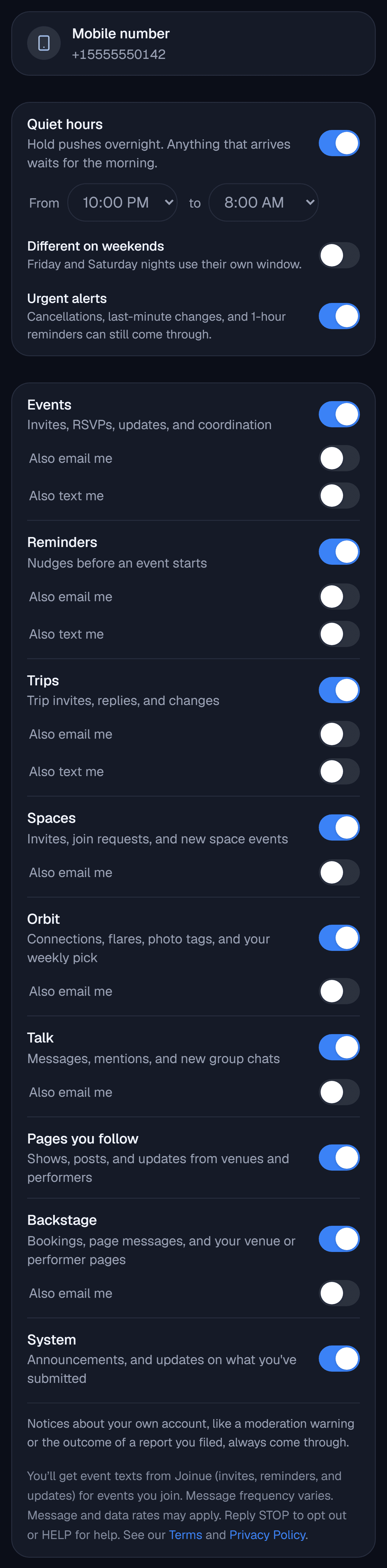
Message frequency varies and depends on your event and trip activity. Message and data rates may apply. Joinue does not charge for texts; your mobile carrier’s standard rates apply.
Reply STOP to any Joinue text to stop receiving messages at that number. It works whether or not you have an account, and it stops every kind of message above. Reply HELP for help. If you have an account you can also turn off the “Also text me” toggles in Settings at any time. Replying START re-subscribes.
If you set quiet hours in Settings, texts respect them the same way notifications do, and a message that lands inside your window is dropped rather than delivered late in a batch the next morning. Time-critical messages (a cancellation, a change of time or place, a reminder an hour before) still come through, because that is the text you would want at 11pm. Nothing is lost either way: every text mirrors a notification that is already waiting in the app.
Your mobile number is used only to deliver the messages described here. We do not sell it, and we do not share it with third parties or affiliates for their marketing or promotional purposes. It is shared with our messaging provider (Twilio) for the sole purpose of delivering these texts. See our Privacy Policy and Terms of Service.
Questions about our text messages? Email info@joinue.com.
Last updated: September 17, 2026